Who is a coach, and who needs a rep seat?
Coaches build paths and scenarios and answer coaching; a rep seat is what puts someone on a path and into Practice.
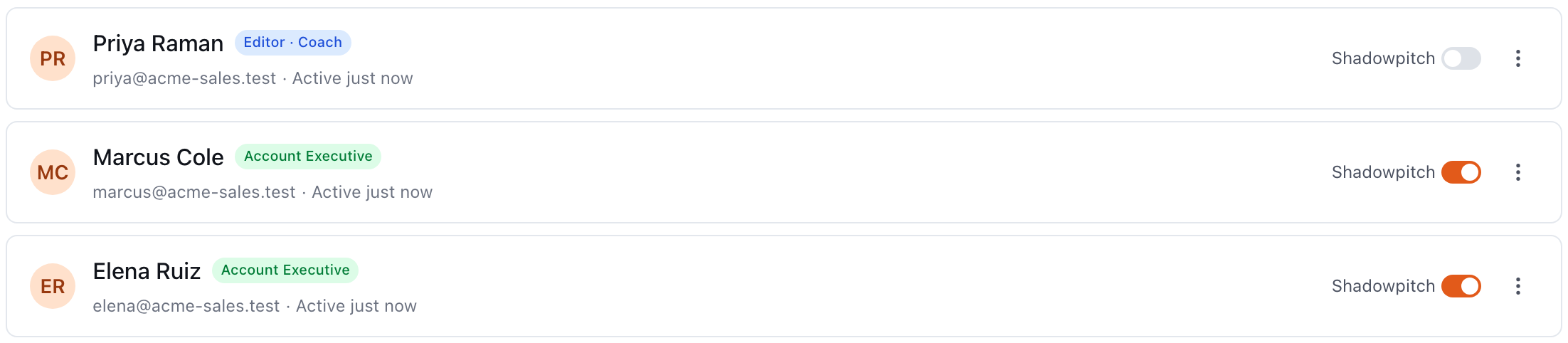
In FlexReady, a Coach runs the program and a rep seat is what makes someone a rep: only people with a rep seat can be put on a path, run scenarios from Practice, and count in your team's numbers. The two are separate switches on each person's row in Settings → Team, and one person can have both.
They sit on top of the workspace roles (Workspace owner, Editor, Member), which keep deciding everything outside FlexReady.
What does a coach do?
A coach sees every FlexReady tab: Scenarios, Paths and Coaching, plus the team files in Library. From there they can:
- create and publish scenarios, and add content
- build paths and assign them
- read the team's practice on Coaching and receive the Monday digest
- be asked for coaching by a rep, and grade what they send (requests wait at the top of Coaching)
- approve or send back a certification
- receive a rep's Ask for a path request by email, when that rep has no path yet
Every Workspace owner and Editor is a coach unless they switch it off. A Member can never be one; their row has no Coach switch.
What does a rep seat do?
A rep seat gives someone their own FlexReady area: the paths assigned to them, the Scenarios page where they run scenarios, and the team files in Library, everything your team has published. Without one, nobody can put that person on a path. Everyone with a rep seat, a job role and a hand-picked name all reach only people who hold a seat.
A coach does not need a seat to manage. They need one only if they also want to be on a path themselves.
For what a seat costs, see FlexReady pricing. The Team page shows how many seats your workspace has in use.
What happens to someone with neither?
They see no FlexReady at all. There is no nav item, and every FlexReady page answers as if it does not exist, the same as a workspace where Bridger has not turned FlexReady on. That is usually a Member who has not been given a seat. See I can't see FlexReady.
How do I change someone's seat or manager switch?
- Open Settings and go to the Team tab.
- Find the person. Their row shows a Coach switch (Workspace owners and Editors only) and a Rep seat switch.
- Turn the switch on or off. It saves straight away, and the seat count at the top of the page updates.
Who is allowed to change them?
| Who is acting | Rep seats | Manager switch |
|---|---|---|
| Workspace owner | Anyone's | Anyone's |
| Coach (not an owner) | Anyone's | Only their own, to step down |
| Anyone else | No | No |
Two limits apply to everyone:
- Someone has to be a coach. The last coach in a workspace cannot switch themselves off. The portal says "Someone has to be a coach. Make another person a coach first."
- An Editor who steps down cannot step back up on their own. Once they are not a coach, only a Workspace owner can turn the switch back on.
Changing someone's workspace role also changes this. An Editor moved to Member stops being a coach, because Members never are.
Does inviting someone give them a seat?
No. An invitation sets the person's permission and, when FlexReady is on, their job role. The rep seat is a separate switch you turn on from their row afterwards. See Inviting a teammate.
Related
- Roles in your workspace
- How do I assign a path to my team?
- Getting started with FlexReady, the rep's view
This did not answer your question? Email hello@bridgercreative.com.